Make a Repeatable Checklist for Routine Computer Tasks
Turn a recurring computer task into a short, useful checklist that records the right order, catches handoffs and helps you resume after an interruption.
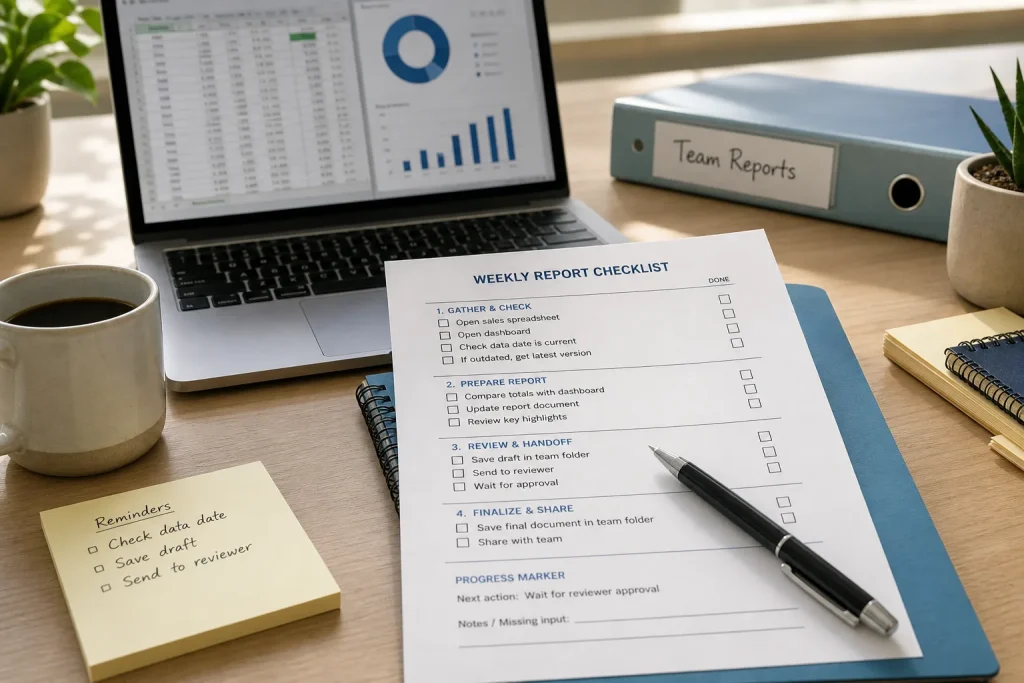
On Monday morning, you open the shared folder to prepare the team’s weekly report, but you cannot remember whether the latest figures come from the sales spreadsheet or the dashboard. A repeatable checklist can put that decision, along with the rest of the routine, in one place. The goal is not to document every click. It is to make the important actions easy to follow and the next move clear if work stops midway.
Choose one routine with a clear finish
Start with a task that happens often enough to benefit from a written sequence and has a recognizable end. Examples include preparing a weekly report, closing out a support queue, or saving files from a recurring meeting. Avoid beginning with a broad responsibility such as “manage projects.” That phrase covers too many different processes to fit a useful checklist.
Describe the routine as an action and a result: “Prepare and share the weekly report” or “Archive completed support requests.” The result gives you a way to tell when the checklist is finished. If the process changes substantially depending on the situation, choose one common version first. You can add a separate path for an unusual case later.
Also decide who will use the list. A checklist for your own work can use familiar shorthand. One that colleagues may follow needs enough context to make terms and file locations clear. Keep the intended reader in mind as you draft.
Gather the real sequence before writing
Before drafting, collect the materials the routine depends on: the source files, relevant application, destination folder, and any rule for naming or sharing the result. For a report, that might mean a spreadsheet, a dashboard, a document template, and a team folder. Put these references within reach so the checklist can point to the actual working locations rather than vague labels such as “the usual file.”
Then write down the actions in the order they normally happen. Use brief verbs: open, compare, update, save, review, share. Include decisions that change what happens next, such as checking whether a source file has been updated. Skip details that are obvious to the intended reader or vary from one run to another.
A useful draft includes the handoffs between stages. For example, “Save the draft in the team folder” is different from “Send the report.” If a colleague needs to review the document before it goes out, make that pause visible. A checklist should reflect the process people are expected to follow, not simply the quickest path through the software.
Write items with visible results and clear decisions
Each line should describe an action that can be checked off without guesswork. “Check the report” is hard to interpret. “Compare the totals in the report with the dashboard” tells the reader what to look at. “Finish the files” is similarly vague; “Save the final document in the team folder” identifies an observable result.
Put actions in the order they need to happen. If you must review a document before sharing it, keep review above the sharing item. When a result changes the next action, write both paths: if the source file is current, continue; if it is outdated, get the current version before updating the report. That makes the checklist useful without treating every possible action as mandatory.
Use these checks to decide what belongs in the list:
- Check whether the task has a clear finished result; if it does, name that result, and if it does not, narrow the task to one repeatable outcome.
- Check whether each source file and destination has a recognizable name or location; if it does, use that name, and if it does not, clarify the approved location before drafting.
- Check whether an action can be observed as complete; if it can, describe the visible result, and if it cannot, replace vague wording with a specific action or decision.
- Check whether a source is current; if it is, proceed with it, and if it is not, obtain the current version or pause for the source owner.
- Check whether another person must review the work; if review is required, name the reviewer or role and wait for approval, and if it is not, remove that handoff.
- Check whether the task could stop midway; if it could, add a progress marker naming the next action, and if it cannot, keep the list free of unnecessary status fields.
- Check whether an item repeats another or describes an obsolete screen; if it does, combine or update it, and if it remains distinct and useful, keep it in the sequence.
Keep the list compact. Combine closely related actions when they are naturally completed together, but split a line when it hides a decision or a likely stopping point. A checklist that is too detailed becomes another task to maintain; one that is too sparse cannot help someone resume after an interruption.
Add a reliable pause and handoff point
Routine computer work is often interrupted by a message, a meeting, or a missing file. Make the checklist useful in that moment by including a brief progress marker. It can be a final item in each major section, such as “Save the draft and note any missing input,” or a small status field at the top: “Next action: compare the updated totals.”
Use the tools already available to your team. A shared document, a task card in a work app, or a pinned note may be enough. Store the checklist close to the files or workspace where the routine happens, and give it a plain name that a colleague can find. If the task includes sensitive information, follow your organization’s rules for storing it; the checklist should point to approved locations, not copy private data into a less suitable document.
Make ownership clear when another person must take over. Name the role or team responsible, and state what they need to do next. “Send to reviewer” is more useful when the intended review destination is specified. Avoid putting personal passwords or access codes in a checklist; use approved account and access procedures instead.
Revise the draft after an ordinary run
Use the checklist during the next normal instance of the task, not just while imagining how it works. Notice where you hesitate, where an item is already obvious, and where an action is missing. If a colleague is the intended user, ask them to follow the wording and mark any unclear point. The purpose is to improve the instructions, not to judge the person using them.
After the run, revise only what the experience exposes. Clarify an ambiguous verb, add a necessary decision, or remove a line that repeats another. If an application screen changes, update the reference or location rather than preserving an obsolete click sequence. Keep a simple owner or review note if the process needs periodic upkeep.
Hypothetical worked example: Imagine a team preparing a weekly report from a shared spreadsheet and a sales dashboard. For this invented example, the spreadsheet’s reporting period is unclear, the report template is blank, and the team lead must review the draft before sharing. First, the preparer opens the spreadsheet and checks its period. Because the period is unclear, they pause and ask the spreadsheet owner to confirm it rather than copying figures. Next, they compare the confirmed period with the dashboard, update the report template, and save the draft in the team folder. They request the team lead’s review and mark “awaiting review” as the status. Once the lead approves it, they share the report and record its folder location. The result is a report with a confirmed source period and a visible handoff; the tradeoff is that the unclear source delays completion until its owner responds.
Keep the checklist useful as the routine changes
A checklist is a working aid, not a permanent description of the process. When a source moves, a reviewer changes, or an application is replaced, update the affected line and remove stale directions. If the task gains a genuinely different path, create a short companion section rather than crowding the main sequence with exceptions.
Make the next action visible whenever you stop, and leave the checklist where the next person will look for it. That small habit turns a sequence of remembered clicks into a shared process: clear enough to repeat, brief enough to use, and easier to resume when the work does not happen in one sitting.